
article
Waitlist Creator: Create a Waitlist Page in Minutes (2026)
Looking for a waitlist creator? What one is, how it differs from a waitlist builder or website, and how to create a page in minutes — free to start.
If you searched for a "waitlist creator," you want one thing: a way to create a waitlist and start collecting signups — fast, without building a website or wiring up three tools. This guide explains what a waitlist creator is, what to look for, and how to have one live in minutes.
The short answer
A waitlist creator is a waitlist tool that builds a signup page or form for you and stores the people who join. The fastest ones let you either embed a form on the site you already have or publish a hosted waitlist page — with referrals and email built in. GetWaitly does both, free to start.
Not sure yet whether you need a waitlist at all, or just a page that says "coming soon"? Here is the difference and how to choose.
What is a waitlist creator?
A waitlist creator is software for building a "join the waitlist" signup experience before your product launches. At minimum it gives you:
- A signup form that collects emails (and optionally names, phone numbers, or answers to custom questions).
- A place to store those signups — a subscriber list you can search, filter, and export.
- A way to reach them — confirmation and update emails.
Waitlist creator, builder, maker, or website — what's the difference?
People use these words for the same job, and the differences are small but real:
| Term | What people usually mean | What to check before you pick |
|---|---|---|
| Waitlist creator (or waiting list creator) | A tool that builds the signup page or form for you | A hosted page and an embeddable form |
| Waitlist builder | The same tool, with emphasis on customising the form or layout | How much of the page you can actually change |
| Waitlist maker / waitlist generator | Casual phrasing for the same thing | How fast you can go from zero to published |
| Waitlist website (or waitlist website creator) | A standalone site whose only job is collecting signups | Whether you get a real page without owning a domain |
| Waitlist page (or waitlist page creator) | The single page a visitor lands on | One field, one button, one promise |
| Waitlist app | Either the tool itself, or a waitlist for a mobile app | A mobile-friendly signup flow — see the app launch waitlist plan |
If you want a waitlist website creator specifically — a page you can share without having a site of your own — that is the case where a hosted page beats an embed. If you already have a site, what you actually need is the form, not a new website.
One thing to rule out before you search further: "creator waitlist" (as in Canva creator waitlist, Beli creator waitlist) means a waitlist for content creators, not a tool that creates waitlists. Different job entirely. This page is about the tool.
What to look for in a waitlist creator
Before you pick one, check these five things:
- Two ways to publish — an embeddable form for the site you already have, plus a hosted page if you don't have one yet.
- Referrals — every subscriber gets a unique link, and referrals move them up the queue. This is the growth loop that separates a waitlist from a plain email form.
- Email built in — you should be able to send updates and your launch announcement without a separate email tool.
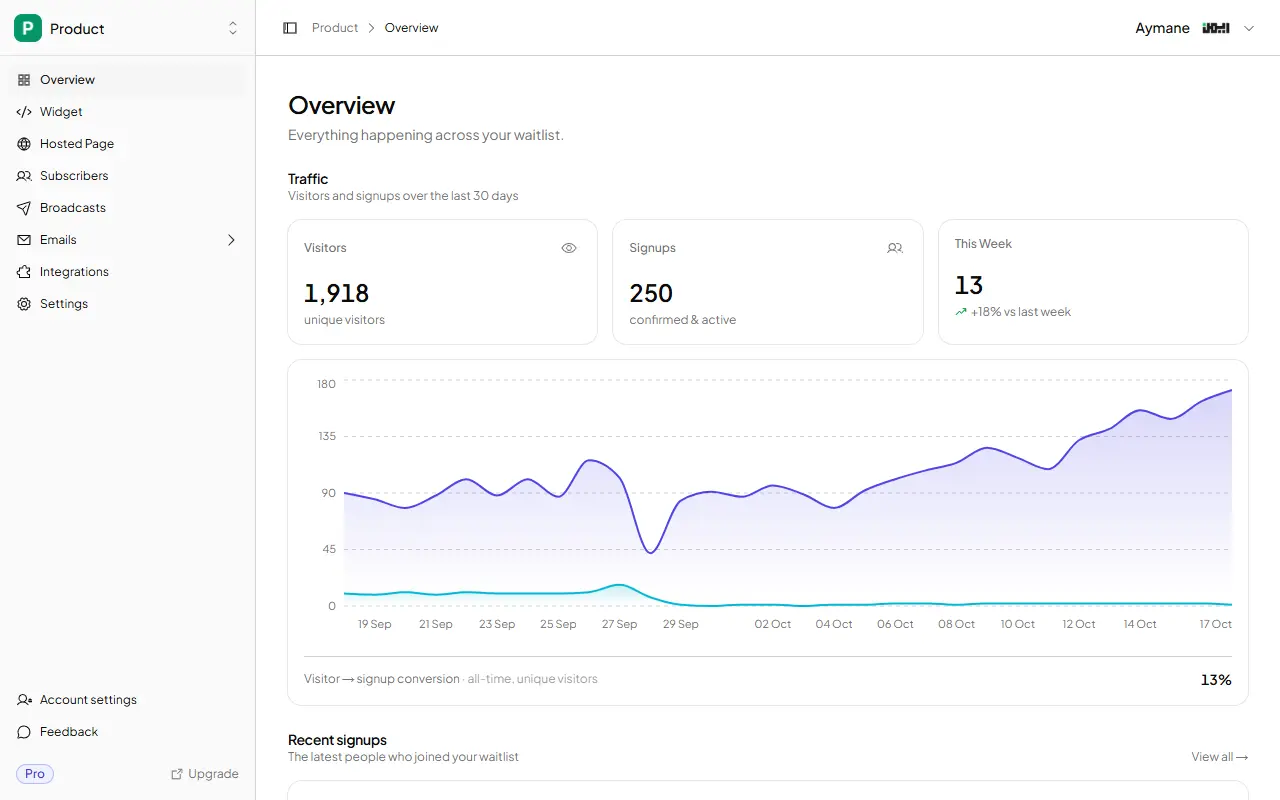
- Analytics — views, signups, and conversion rate, so you know whether the problem is traffic or the page.
- A real free plan — validation-stage founders should not pay before they have a single subscriber.
How to create a waitlist in minutes
Here is the whole flow with a dedicated waitlist creator:
- Create the waitlist. Sign up, name it, and pick where the form lives.
- Choose your form. Embed a branded signup widget on any site with one script tag, or publish a hosted page at
getwaitly.com/w/your-id. - Style it. Set your accent color, font, and copy so it matches your brand.
- Turn on referrals. Every subscriber gets a unique referral link that moves them up the list.
- Write the welcome email. Set expectations: what you're building and when you'll launch.
- Share the link and watch the analytics. Views, signups, and conversion rate update in your dashboard.
That is a live waitlist in under five minutes — no code, no separate email platform, no spreadsheet.
Four ways to create a waitlist page
| Approach | Time to live | Cost | Hosted page? | Referrals? | Best for |
|---|---|---|---|---|---|
| Hosted waitlist page | 5 min | $0–$5/mo | Yes | Yes (paid) | No site yet |
| Embed on existing site | 15 min | $0–$5/mo | Optional | Yes (paid) | You have a page |
| Form builder + page | 30 min | $0 | No | No | A quick test |
| Build it yourself | 20–40+ hrs | $0–$20/mo | You build it | You build it | Developers |
A hosted page is the fastest path; embedding is the best fit if you already have a site. Building it yourself only makes sense if you want the learning — see Should You Build Your Own Waitlist?.
What a waitlist page actually needs to convert
The page can be short. It only has to answer three questions: what is this, is it for me, and what happens if I join?
- A one-line promise. Not a feature list — the outcome. "Get early access to X" beats "X is a platform for Y."
- One field. Email only. Every extra field costs conversions; name and phone can wait.
- What happens next. "We'll email you once, at launch" removes the fear of spam.
- A reason to join now. Early access, a founding-member price, or a queue position.
- Referrals (optional). If you turn them on, each subscriber gets a link and moves up the list when friends join — the list grows itself.
More on the copy itself: Waitlist Copywriting That Converts.
Waitlist creator vs form builder vs landing page builder
These get confused, so here is the difference:
- A form builder (Tally, Typeform, Google Forms) collects submissions. It does not do referrals, queue positions, or the follow-up email sequence without extra tools.
- A landing page builder (Carrd, Webflow) makes a page. You still need a form backend, an email tool, and a referral tool on top.
- A waitlist creator is purpose-built for pre-launch: form, referrals, emails, and analytics in one place.
If all you need is a contact form, a form builder is fine. If you're launching a product and want your list to grow, a dedicated waitlist creator is the right tool. See which form builder fits a waitlist for the full comparison, or how to build a Tally waitlist for the step-by-step.
Free waitlist creator
You do not need to pay to start. A good waitlist creator has a free plan that covers your first 100 subscribers — a free waitlist website you can share immediately, enough to validate whether anyone wants the thing. GetWaitly's free plan includes a hosted page, an embeddable widget, custom branding, analytics, CSV export, and spam protection. Referrals and email broadcasts start on the $5/mo Starter plan.
If you are still deciding which tool, the best waitlist tools comparison ranks the dedicated options side by side.
FAQ
What is a waitlist creator?
A waitlist creator is a tool that builds a waitlist signup page or form and stores the people who join. It typically includes a signup form, a subscriber list, and email follow-up — and often referrals.
How do I create a waitlist for free?
Use a waitlist creator with a free plan. With GetWaitly you can create one waitlist and collect up to 100 subscribers at no cost, then upgrade to $5/mo when you need referrals and broadcasts.
What is a free waitlist website?
A free waitlist website is a hosted signup page you publish without paying or writing code. GetWaitly's free plan includes one at getwaitly.com/w/your-id, plus an embeddable widget, analytics, and up to 100 subscribers.
Do I need a website to create a waitlist?
No. If you have a site, embed the signup form with one script tag. If you don't, publish a hosted waitlist page at getwaitly.com/w/your-id — no code required.
Is a waitlist creator the same as a form builder?
No. A form builder collects submissions; a waitlist creator adds referrals, queue positions, email broadcasts, and analytics. A form builder is a component; a waitlist creator is the whole pre-launch workflow.
How long does it take to create a waitlist?
With a dedicated tool, a few minutes. Create the waitlist, embed the form or publish the hosted page, and share the link.
Can I use a waitlist creator for a beta or early-access list?
Yes. A waitlist is the standard way to build a beta or early-access list. You collect interest first, then invite people in waves using the same list and emails.
Related guides
- Waitlist Copywriting That Converts — the five elements with before-and-after examples
- Waitlist with Referral Tracking — the growth loop, explained
- Waitlist Page Examples & Templates (Free to Copy) — real pages to adapt
- Which Form Builder for a Waitlist? (Tally, Typeform, Carrd, GetWaitly) — form builders vs a dedicated waitlist tool
- 7 Best Waitlist Tools for Solo Founders in 2026 — the full comparison
- How to Add a Waitlist to Any Website — the generic two-line embed
- How to Validate a SaaS Idea Without Building Anything — where a waitlist fits in validation
The simple, affordable waitlist for indie hackers. Start free in 5 minutes — no credit card required. Try GetWaitly free →

written by
Aymane E.
Founder of GetWaitly. I write about validating ideas, pre-launch, and growth from building a waitlist tool as a solo founder.
Follow on X